Archive a project
Hide a finished or paused project from your active Projects list while keeping its board, tasks, and history, then restore it whenever you need it again.
Last updated
A project in Bulk groups related tasks into a single board so the right people see the right work. When a project is finished or paused, you can archive it. Archiving moves the project out of your day-to-day Active list but keeps the board, its tasks, and its full history intact, so nothing is lost and you can bring it back at any time.
Archive a project when the work is complete, on hold, or no longer relevant to this quarter, and you want your Active list to show only live work. Because archiving is fully reversible, you do not have to decide whether to keep a project forever. You can archive it now and restore it later.
Archiving is not deleting
Archiving hides a project from the Active tab, but it never removes anything. The board, every task, and the activity history stay exactly as they were. To permanently remove a project and all of its tasks, use Delete instead. That action is separate, is guarded by a confirmation dialog, and cannot be undone.
Before you start
To archive or restore a project you need the Archive or restore projects permission. In Bulk's default roles this permission is granted to Super user, Entity admin, and Manager. If you do not see the Archive option in a project row menu, ask a workspace administrator to check your role.
You reach projects from the main navigation under Tasks → Projects, which opens the Projects page for the plant (entity) you currently have selected. Archiving only affects the selected plant's projects.
Archive a project
- Open Tasks → Projects from the navigation.
- Make sure the Active tab is selected. The Active and Archived tabs each show a live count of how many projects they contain.
- Find the project in the list. You can use Search projects to narrow it down.
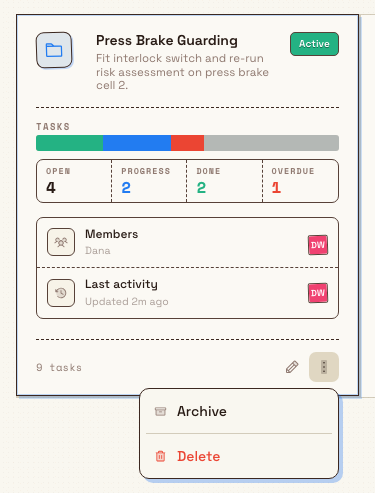
- Right-click the project's row to open its action menu.
- Choose Archive from the menu.
The project is archived immediately, with no extra confirmation step. Bulk shows a Project archived message, the row leaves the Active tab, and the Active count drops by one while the Archived count rises by one.
Find and restore archived projects
Archived projects live on the Archived tab of the same Projects page.
- On the Projects page, select the Archived tab.
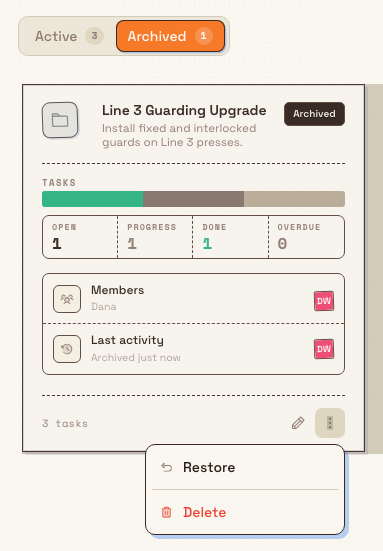
- Archived projects appear as rows with an Archived status badge. The Activity column shows when they were archived.
- Right-click the project's row and choose Restore.
Bulk shows a Project restored message and the project returns to the Active tab with its tasks and history. New Folder and New Project are hidden while you are on the Archived tab.
Example: Gotham Applied Sciences
Bruce Wayne pauses Torque Tool Standardisation while the Gotham assembly team reviews its renewal schedule. The project has two tasks: the calibration register review is complete and the renewal schedule is still to do. Bruce finds the project on Active, right-clicks its row and chooses Archive. The work moves to Archived with both tasks preserved. When planning resumes, Bruce selects Archived, right-clicks the row and chooses Restore. The same project and its two tasks return to Active.
What archiving does and does not change
- Keeps everything. The board, all tasks, members, owner, and activity history are preserved unchanged.
- Hides from active views. The project no longer appears on the Active tab, keeping day-to-day lists focused on live work.
- Is reversible and immediate. Archive and restore both take effect right away with no confirmation dialog, and either can be reversed by the opposite action.
- Applies to one project at a time. You archive or restore each project from its own row; there is no bulk archive.
Troubleshooting
Restore does not succeed for a project in another plant. Restoring requires the project's plant (entity) to be active. If the plant has been made inactive, reactivate it first, then restore the project.
You cannot see the Archive or Restore option. The menu item only appears if you hold the Archive or restore projects permission. Ask an administrator to confirm your role.
Feature state
Archiving and restoring projects is a generally available feature. It is available to any workspace on the Projects page for every plant you can access, subject to the permission rules described above.