Void an invoice
Cancel an issued invoice while keeping it on record for audit and releasing any billed production jobs.
Last updated
Voiding cancels an invoice you have already issued. In Bulk, an issued invoice is a frozen, read-only billing document, so you cannot simply edit it to fix a mistake. Instead you void it: Bulk keeps the invoice on record for audit, marks it Voided, and releases any production jobs it billed so they become available to invoice again. A production job is a unit of work on an order — voiding hands those jobs back to the pool of work that still needs billing. A miscellaneous invoice with no job links has no production jobs to release.
Void an invoice when an issued document is wrong and needs to be reissued — for example the wrong customer purchase order (PO) number, the wrong lines, or the wrong customer. You void the incorrect invoice and create a replacement from the released jobs.
Voiding cannot be undone
Voiding is permanent. There is no un-void action. To correct an issued invoice you void it and create a new, replacement invoice. The voided invoice stays visible for your records, but it is no longer an active bill.
Before you begin
- Permission. Voiding requires the void invoices permission
(
production_invoicing.void). By default this is granted to administrators (the Super user and Entity admin roles), the Manager role, and the Invoicing role. The Operator role can submit and confirm invoices but cannot void them, so the Void action does not appear for operators. - Invoice status. You can only void an invoice that is Issued, Send failed, Sent, or Confirmed. The Void action is hidden for every other status. A draft (still-editable) invoice is not voided — you delete it with Discard instead. An invoice that has reached the final Issued Confirmed state is terminal and can never be voided (see When you cannot void an invoice).
Void an invoice
- In the left sidebar, open Finance, then select Invoices.
- Open the invoice you want to cancel. It must be in Issued, Send failed, Sent, or Confirmed status.
- In the invoice header, select the three-dots More invoice actions button to open the overflow menu.
- Choose Void (shown in red at the bottom of the menu).

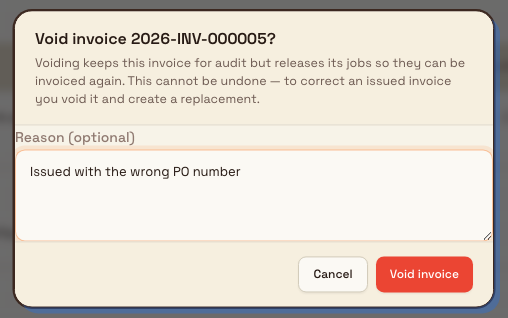
- In the Void invoice confirmation dialog, optionally type a Reason —
for example,
Issued with the wrong PO number. The reason is saved with the invoice and shown in its history. - Select Void invoice to confirm. Bulk voids the invoice and shows an Invoice voided confirmation. Selecting Cancel closes the dialog with no change.
What happens when you void
Confirming a void changes several things at once:
- The invoice becomes Voided and read-only. Its Details status changes to Voided, and the red lock banner says the invoice is no longer active. The lines and totals are locked. This layout does not place a status chip next to the invoice number.
- The reason and history are kept. If you entered a reason, it appears on the invoice as a Void reason line, and the void is recorded in the invoice's lifecycle history timeline along with who voided it and when. Nothing is deleted — the invoice remains searchable for audit.
- The invoice's jobs are released. Each production job the invoice billed has its date invoiced cleared, so long as no other live (non-voided) invoice still bills that job. Released jobs return to the pool of invoiceable work and can be placed on a new invoice.
- Allocated credit notes are returned. If a credit note had been allocated against this invoice, that allocation is automatically reversed and the credit is restored to the credit note, ready to allocate elsewhere. A credit note that was already voided is left untouched.
- Automations can react. Voiding raises an invoice voided event, so any workflow you have built to respond to a voided invoice runs automatically.

Example: correcting a packing charge at Wayne Corp
This fictional example uses Wayne Corp at Gotham Applied Sciences. Bruce
Wayne creates a miscellaneous invoice for Iceberg Logistics, with one
Protective packing line, quantity 1 at 15.00 GBP. The invoice number is
2026-INV-000005. He checks the total and issues it using the normal confirmation.
The packing charge was entered in error. Bruce opens More invoice actions,
selects Void, enters Packing charge entered in error, and confirms
Void invoice. The invoice shows the red inactive banner and the saved reason.
Its original line and 15.00 GBP total remain on record.
This miscellaneous invoice had no production jobs and no credit allocations. The example therefore demonstrates the invoice cancellation and retained reason, not job release or credit reversal. On a standard invoice that billed jobs, eligible job links are released as described above.
When you cannot void an invoice
- Issued Confirmed invoices are terminal. Once an invoice reaches the final Issued Confirmed state it is permanently locked and cannot be voided. Attempting it is rejected with the message An issued-confirmed invoice is terminal and cannot be voided. To adjust the amount owed on a finalized invoice, create a credit note instead (More invoice actions → Create credit note).
- Drafts are discarded, not voided. A draft invoice has never been issued, so there is nothing to keep for audit. Use Discard to delete it.
- Already-voided invoices. Voiding an invoice that is already voided does nothing — the status stays Voided.
Void or credit note?
Void when the whole invoice is wrong and you will reissue it — voiding releases the jobs so you can bill them again. Use a credit note when the invoice is essentially correct but the customer is owed an adjustment, or when the invoice is Issued Confirmed and can no longer be voided.
Feature availability
Voiding invoices is a generally available part of the Finance module. It is available according to the installed app and access settings. The Void action depends on permission, eligible invoice status and confirmation ownership. When confirmation is owned by a workflow, the workflow performs the void instead of showing a manual Void action.
Troubleshooting
- The Void action is missing. Confirm two things: your role includes the void invoices permission, and the invoice is Issued, Send failed, Sent, or Confirmed. In workflow-owned confirmation, manual Void is also hidden. Void is hidden on drafts, on Issued Confirmed invoices, and for roles without the permission (such as Operator).
- You need to change a finalized (Issued Confirmed) invoice. It cannot be voided. Create a credit note against it to record the adjustment.
- You voided the wrong invoice. There is no un-void. Create a replacement invoice from the released jobs. If a customer had a credit note allocated to the voided invoice, that credit was returned automatically and is available to allocate again.
Related guidance
Issue or confirm an invoice
Issue an approved or ready draft invoice to lock its detail and keep its invoice number, then advance it through the confirmation track to Issued Confirmed.
Create a credit note
Raise a customer credit in Bulk, standalone or against an issued invoice, and save it as a draft ready to issue.