Beta
Release a quality hold
Clear a quality hold in Bulk to return held material to normal use, recording who released it, why, and under what conditions — as a full release, a partial release, or a scrap.
A quality hold blocks specific material — raw material, work in progress, or finished goods — from being used or shipped while its conformance is in question. Releasing a hold lifts that block. You release a hold once the material has been re-inspected, reworked, or otherwise cleared, so the held quantity can move back into normal production and shipping.
This guide covers the three ways to close out an open hold from the quantity it is holding:
- Release — clears the entire remaining held quantity and closes the hold.
- Partial Release — clears a chosen quantity now and keeps the rest on hold.
- Scrap — writes off the remaining held quantity instead of returning it to use.
All three actions are controlled by the same permission and are reached from the same places, so this guide treats them together.
Beta feature
Quality holds are a beta capability. The behaviour described here is verified against the current Bulk code, but the feature is still being validated and screens and labels may change. Treat this article as verification-required rather than a description of a generally available feature.
Before you start
To release, partially release, or scrap a hold you need the Release quality holds permission (quality_holds.release). In the default role set this permission is granted to the Quality, Entity admin, and Super user roles. Users with only view access to quality holds can open a hold but see no release actions.
The hold itself must still be open. A hold can be released only while its status is Active or Partial Release and at least one unit remains held. Holds that already read Released or Scrapped are closed: their release actions no longer appear, and the backend rejects a second attempt with the message "Hold already closed".
Where to release a hold
You can start a release from two places:
- Quality Holds list — open Quality → Quality Holds. Each row has a "more actions" menu (the three-dot control) with View, and — when you have permission and the hold is still open — Release, Partial Release, and Scrap.
- Hold detail page — open a hold to see its full record. The same Release, Partial Release, and Scrap actions sit in the "more actions" menu in the page header.
If none of the release actions appear, either the hold is already closed or you do not hold the release permission. See Troubleshooting.

quality.release-hold-01
Release the full hold
Use Release when all of the remaining held material has been cleared and can return to normal use.
- From the Quality Holds list row menu or the hold detail header menu, select Release.
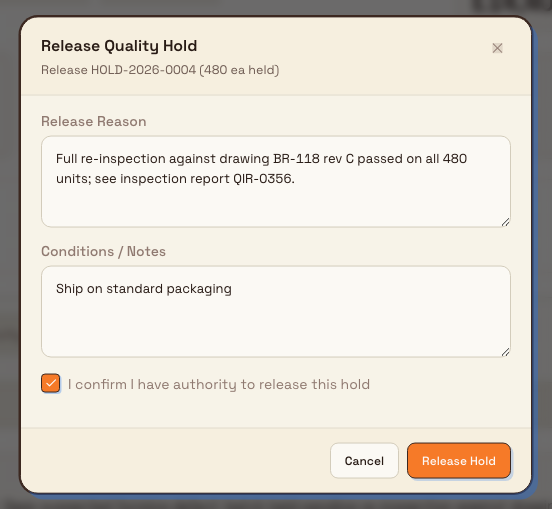
- The Release Quality Hold dialog opens. Its subtitle confirms the hold number and how much is currently held, for example "Release HOLD-2026-0042 (480 units held)".
- In Release Reason, describe why the material is being cleared. This field is required — you cannot submit without it. Reference the evidence that supports the decision, such as a re-inspection result or a disposition record.
- Optionally, use Conditions / Notes to capture any conditions attached to the release, such as "acceptable for internal use only".
- Tick I confirm I have authority to release this hold. The dialog will not submit until this box is checked.
- Select Release Hold.
On success, a confirmation appears ("Hold HOLD-2026-0042 released"), the dialog closes, and the hold moves to the Released status.
quality.release-hold-02
Release part of a hold
Use Partial Release when only some of the held material has been cleared and the rest must stay on hold.
- Select Partial Release from the row menu or the hold detail header menu.
- In the Partial Release dialog, enter the Quantity to Release. You must release at least one unit and no more than the quantity currently held.
- Enter a Release Reason and tick the authority confirmation, exactly as for a full release.
- Select Record Partial Release.
The released quantity is deducted from the amount held and logged as a partial release. If the amount released empties the hold, the hold moves to Released; otherwise it moves to Partial Release and stays open so you can release, partially release, or scrap the remainder later.
Scrap the remaining quantity
Use Scrap when the remaining held material cannot be used and must be written off rather than returned to production. Scrap clears the whole remaining held quantity and closes the hold with a Scrapped status.
- Select Scrap from the row menu or the hold detail header menu.
- In the Scrap Hold dialog, enter a Scrap Reason.
- Tick I understand this action will scrap the remaining held quantity.
- Select Scrap Hold.
Releasing and scrapping are final
Releasing returns held material to normal production and shipping, and scrapping writes it off. Neither action can be reversed from the hold — a released or scrapped hold is closed. Because a quality hold exists to stop potentially non-conforming material from being used or shipped, confirm the disposition is correct before you release. If the same material needs holding again later, place a new hold rather than trying to reopen the closed one.
What happens after you release
Once a hold is released:
- The held quantity drops to zero and the total released quantity is recorded.
- The hold's status badge changes to Released (or Partial Release while quantity still remains after a partial release).
- The person and time of release are stored, along with the reason and any conditions.
- The release is written to the hold's activity and audit trail, so there is a durable record of who cleared the material and why.
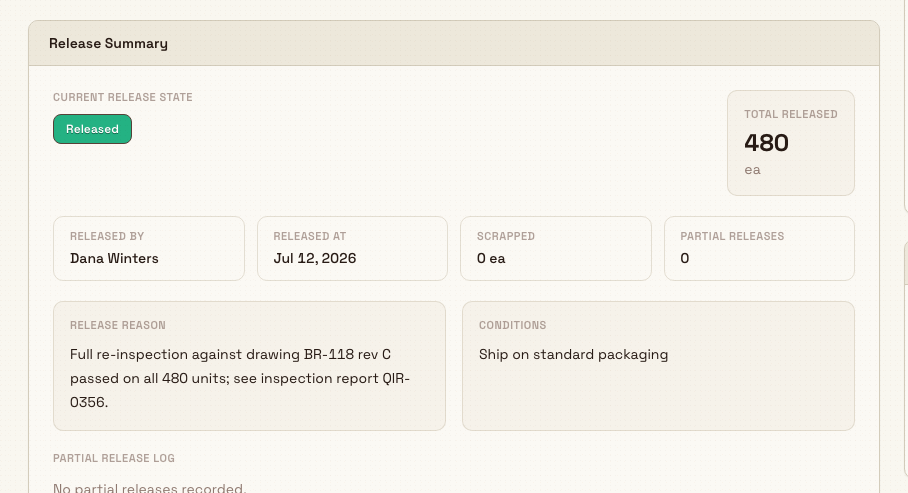
You can review all of this on the hold's Release tab, in the Release Summary card. It shows the current release state, the total released quantity, who released it and when, the release reason, the conditions, and a log of any partial releases.
quality.release-hold-03
Example: clearing a stop-ship hold at Leeds Fabrication Plant
Granite Peak Manufacturing runs a quality hold process at its Leeds Fabrication Plant. A batch of 480 steel brackets is placed on a Stop Ship hold (HOLD-2026-0042) after a dimensional check flags a suspected forming defect, preventing the batch from being shipped.
Quality re-inspects the full batch against the drawing. All 480 brackets pass, so Dana Winters — who holds the Entity admin role at Leeds — opens the hold and selects Release. In Release Reason she writes "Full re-inspection against drawing BR-118 rev C passed on all 480 units; see inspection report QIR-0356." She adds a condition in Conditions / Notes — "Ship on standard packaging" — confirms she has authority, and selects Release Hold. The batch returns to the shipping queue, and the Release Summary preserves the reason and report reference for the audit trail.
Had only 300 brackets passed, Dana would instead use Partial Release for 300 units, leaving the remaining 180 on hold pending rework — and later either release or scrap that remainder.
Limitations and feature state
- Beta capability. Quality holds are still being validated. Confirm behaviour in your own environment before relying on it for regulated release decisions, and expect labels and screens to change.
- The authority confirmation is an on-screen attestation. The "I confirm I have authority to release this hold" checkbox is enforced in the dialog to make you confirm before submitting. It is not a separate approval step, and the backend release does not check it or verify the approver named when the hold was created. Any user with the release permission can release any open hold in their plant.
- Release is per hold, not per line. A full release clears the entire remaining held quantity at once. To keep part of the material held, use Partial Release instead.
- No un-release. There is no action to move a released or scrapped hold back to Active. Re-holding requires placing a new hold.
Troubleshooting
- No Release, Partial Release, or Scrap actions appear. The actions show only when you have the
quality_holds.releasepermission and the hold is still open with quantity remaining. Check the status badge: if it reads Released or Scrapped, the hold is already closed. If it is Active but you still see no actions, your role does not include the release permission — ask an administrator to grant a role such as Quality or Entity admin. - "Hold already closed" error. The hold was released or scrapped, possibly by someone else since you loaded the page. Refresh the hold. If the material genuinely needs holding again, place a new hold.
- Cannot submit the release dialog. The Release Reason is required and the authority checkbox must be ticked. Fill both and try again.
- Partial release is rejected. The quantity must be at least one unit and no greater than the quantity currently held. Enter a value within that range.
Related guidance
- Put work on quality hold — how a hold is placed in the first place.
- Link quality and production records — connect holds to the orders, jobs, and NCRs they affect.
- Review and disposition an NCR — decide the fate of non-conforming material that a hold protects.
- Quality — the full quality module overview.
Put work on quality hold
Place a quality hold with the three-step New Quality Hold wizard to stop suspect material moving, record how it is contained, and set what should happen to it next.
Create and manage an 8D report
Run a structured Eight Disciplines (8D) investigation in Bulk — from problem and team, through root cause and corrective action, to closure with effectiveness checks.