Configure absence types
Build the leave catalogue for a site — import regional presets or add types by hand, set paid leave, approval, default entitlement days, and max carry-over.
Absence types are the leave categories people pick when they request time off: annual leave, sick leave, bank holiday, and any other category your site uses. Each type carries defaults for whether the leave is paid, whether a manager must approve it, how many days new employees get by default, and how many unused days can carry into the next year.
You configure absence types once per site so logging absences and reviewing balances always use the same catalogue. Day-to-day leave requests live under the People module; this settings page is where you maintain the building blocks those requests draw on.
Before you start
Open Settings, expand the People group, and select Absence Types. The page address ends in /settings/people/absence-types.
Permissions for this page:
- See the list requires View own absences (
absences.view_own). Without it, the page does not load type data. - Add, edit, delete, and Import Presets require Manage absence types (
absences.manage_types).
Those management permissions are included in the built-in People, Entity admin, Manager, and Super user roles. If you can open the page but create or import actions fail, ask an administrator to grant Manage absence types or assign one of those roles.
Absence types are per site. Each entity (plant) keeps its own catalogue. Switch site first if you need to configure another plant.
administration.people.absence-types-01
What the Absence Types page shows
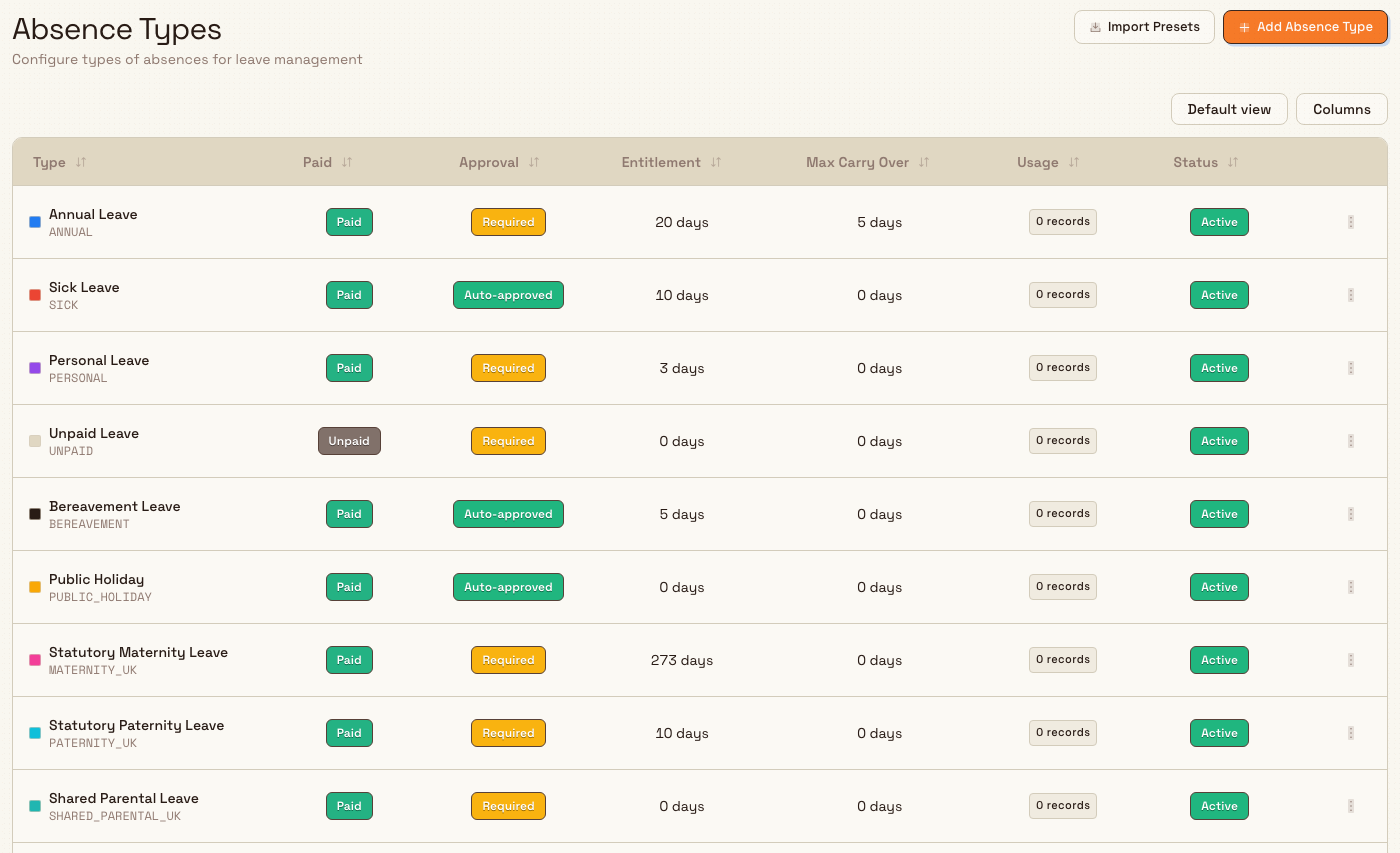
The page header is titled Absence Types, with the description Configure types of absences for leave management. Two actions sit in the header:
- Import Presets — add a regional starter set (existing codes are skipped).
- Add Absence Type — create a single type by hand.
The table lists every non-deleted type for the current site (including inactive types if any exist). Columns:
| Column | What it shows |
|---|---|
| Type | Color swatch, display name, and auto-generated code underneath |
| Paid | Paid or Unpaid badge |
| Approval | Required (manager must approve) or Auto-approved |
| Entitlement | Default annual days (for example 20 days) |
| Max Carry Over | Maximum days that may carry into the next year |
| Usage | How many absence records already use this type (for example 3 records) |
| Status | Active or Inactive |
Each row has an actions menu (Edit, and Delete when the type can be removed).
If the site has no types yet, the empty state reads No absence types yet with the description Create your first absence type to enable leave management. and an Add Absence Type action.
Import regional presets
The fastest way to start is to import a regional preset pack. Import always includes the generic universal types, then adds any region-specific types for the pack you choose.
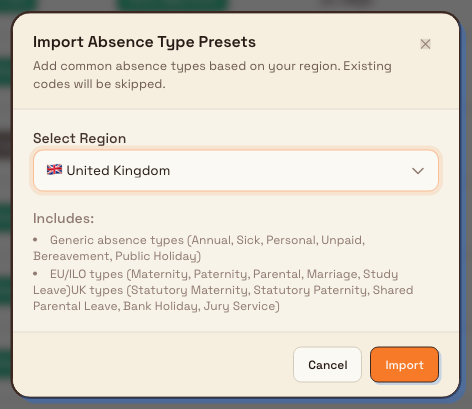
- Select Import Presets. The Import Absence Type Presets dialog opens.
- Under Select Region, choose a pack. Labels include Generic (Universal), Manufacturing-Specific, United Kingdom, and many other country packs (for example Germany, France, United States).
- Review the Includes summary in the dialog — it lists the generic set (Annual, Sick, Personal, Unpaid, Bereavement, Public Holiday) and, for non-generic packs, the kinds of regional types that pack adds.
- Select Import.
Bulk creates any codes that are not already present for this site and skips types whose codes already exist. The confirmation reports how many were created and how many were skipped (for example “Created 11 absence types, skipped 0 existing.”).
Generic types that ship with every import include:
| Code | Name | Defaults (typical) |
|---|---|---|
ANNUAL | Annual Leave | Paid, approval required, 20 entitlement days, 5 max carry-over |
SICK | Sick Leave | Paid, auto-approved, 10 entitlement days |
PERSONAL | Personal Leave | Paid, approval required, 3 entitlement days |
UNPAID | Unpaid Leave | Unpaid, approval required, 0 entitlement |
BEREAVEMENT | Bereavement Leave | Paid, auto-approved, 5 entitlement days |
PUBLIC_HOLIDAY | Public Holiday | Paid, auto-approved |
A United Kingdom import also adds UK-oriented types such as Statutory Maternity Leave, Statutory Paternity Leave, Shared Parental Leave, Bank Holiday, and Jury Service. A Manufacturing-Specific import adds shop-floor oriented types such as work injury, training, shift swap, compensatory time, and safety stand-down. After import, edit any type to match your plant’s actual policy — presets are a starting catalogue, not a compliance guarantee.
administration.people.absence-types-02
Add an absence type by hand
- Select Add Absence Type. The Create Absence Type dialog opens (Add a new type of absence).
- Fill in the fields:
- Name — required, up to 100 characters (placeholder example:
Annual Vacation). Bulk generates a unique code from the name when you save (letters and numbers derived from the name, up to 20 characters). - Color — accent used for the type on this page and related leave views.
- Default Entitlement (days) — default annual days for new employees (0 or greater). Helper text: Default annual days for new employees.
- Max Carry Over (days) — maximum days that can be carried to next year (0 or greater). Helper text: Maximum days that can be carried to next year.
- Paid Leave — when on, Employee receives pay during absence (default on).
- Requires Approval — when on, Manager must approve requests (default on). When off, the type is treated as auto-approved for requests of this type.
- Name — required, up to 100 characters (placeholder example:
- Select Create.
A success message confirms Absence type created. The new row appears in the table with its generated code and Active status.
Edit an absence type
- Open the row’s actions menu and select Edit.
- The Edit Absence Type dialog shows the existing Code as read-only, then the same editable fields as create (name, color, default entitlement, max carry-over, paid leave, requires approval).
- Select Save Changes.
A success message confirms Absence type updated. Changing defaults here does not rewrite past absence records; it updates how the type is labelled and how new defaults apply going forward. Per-employee yearly balances are managed separately under absence entitlements (permission Manage absence entitlements), not on this page.
Delete an absence type
Delete is only available when the type has no absence records (usage count is 0). If records exist, Delete is disabled on the row menu.
- Open the actions menu and select Delete.
- Confirm in the Delete Absence Type dialog. It asks whether you are sure you want to delete the named type (with its code) and states that This action cannot be undone.
- Select Delete.
If something still references the type, the backend rejects the delete with Cannot delete absence type with existing records. Soft-deleted types leave the catalogue; they are not shown in the list afterward.
Prefer editing over deleting types in use
Once people have logged leave against a type, you cannot delete it from this page. Adjust the name, paid/approval settings, or entitlement defaults instead, or leave unused types in place so historical records keep a clear category.
Example: Leeds leave catalogue at Granite Peak Manufacturing
Granite Peak Manufacturing is preparing leave tracking for the Leeds Fabrication Plant. Dana Winters (with the People role) opens Settings → People → Absence Types.
The list is empty, so she selects Import Presets, chooses United Kingdom, and selects Import. Bulk creates the six generic types plus UK types such as Bank Holiday and Statutory Paternity Leave. She then edits Annual Leave: she keeps paid leave and approval required, sets default entitlement to 25 days to match plant policy, and sets max carry-over to 5. For a unpaid sabbatical category the plant wants later, she selects Add Absence Type, names it Sabbatical, turns Paid Leave off, leaves Requires Approval on, and creates it. When someone later logs annual leave against the imported type, that row’s usage count rises and Delete becomes unavailable for that type.
Expected result
After setup, the Absence Types table shows every leave category for the site with clear paid/unpaid and approval badges, default entitlement and carry-over values, and a usage count. Those types appear as selectable options when someone records an absence in the People module. Importing the same region again only adds missing codes; existing ones are skipped so you can safely re-run an import after adding a few types by hand.
Feature state and limits
Configuring absence types is generally available. Keep these points in mind:
- Types are entity-scoped. Leeds and another plant do not share a catalogue.
- Codes are generated on create and are not edited in the dialog afterward (edit shows code read-only).
- Import skips existing codes rather than overwriting names or defaults on types you already customized.
- Default entitlement is a catalogue default for new employees; actual per-person yearly balances use entitlements elsewhere in People (
absences.manage_entitlements). - Delete is blocked while any non-deleted absence record uses the type.
- Preset packs are convenience starters. They are not a legal or payroll configuration of statutory leave for your jurisdiction.
Troubleshooting
- The table is empty and you cannot import or create. You may lack View own absences (list) or Manage absence types (mutations). Ask an administrator for the People role or those permissions.
- Import says types were “skipped”. Those codes already exist for this site. Edit the existing rows if you need different defaults; import will not replace them.
- Delete is greyed out. The type already has absence records (see the Usage column). You cannot remove it while records remain.
- “Cannot delete absence type with existing records”. Same guard from the server — cancel the delete and keep or edit the type instead.
- Types from another plant are missing. Switch to the correct site in the entity switcher, or import/create types for that entity.
- You expected Working hours here. Working hours live under Settings → Organization → Working hours, not under Absence Types.
Related
- People configuration — overview of departments, job titles, absence types, and shifts.
- Configure departments and job titles — how people are grouped and labelled.
- Configure shifts — rotation patterns used when calculating absence days.
- Manage roles and permissions — grant
absences.manage_typesand related People permissions. - People — day-to-day employees, absences, and org structure that consume this catalogue.
- Record an absence — request leave against a type you configured here.
- Use the absence calendar — team leave calendar that colour-codes by type.
Configure departments and job titles
Build the site's department hierarchy with managers and cost centres, and maintain the standard job titles used on employee records and in training.
Configure shifts
Define named work shifts with multi-week rotation patterns, daily start and end times, and breaks so employee records and scheduling share a consistent catalogue per site.