Set training prerequisites
Understand what training prerequisites are in Bulk and how to manage prerequisite requirements today using requirement levels, assignment order, and the versatility matrix.
A training prerequisite is a course or certification that a person should complete before they take a more advanced one. In Bulk, a training program is a single course or certification you track (for example "Working at Height" or "Advanced Rigging"), so a prerequisite is simply one program that comes before another: you would not put someone on Advanced Rigging until they hold the Working at Height qualification.
Use prerequisites when your training has a natural order — a foundation course before a specialism, a basic licence before an advanced one, or a safety induction before hands-on machine work. Getting that order right protects both compliance and safety, and it stops you scheduling someone for work they are not yet qualified to do.
This page explains how prerequisite requirements work in Bulk today, and gives you a reliable way to manage them with the Training features that are available now.
How Bulk handles prerequisites today
It is important to be clear about what the product does and does not do, so you can plan around it.
- You control the order manually. Bulk does not currently provide a screen to record, against a program, the list of other programs that must come first. You decide the sequence and drive it yourself using assignments and the versatility matrix, as described below.
- Bulk does not block or warn on an unmet prerequisite. Assigning an advanced program to a person, or marking them ready for it, does not check whether they have finished the foundation program first. Nothing in the assignment flow, the matrix, or the compliance dashboard enforces an order between programs.
In practice this means prerequisites are a process you run, not a rule the system applies for you. The rest of this page shows how to run that process well.
Do not rely on Bulk to enforce a safety-critical order
Because Bulk does not block an assignment when a foundation program is incomplete, you must confirm the order yourself for anything safety-critical — for example rigging, working at height, or operating machinery. Before you let someone carry out dependent work, check that their foundation training is complete and current (for instance in the Versatility Matrix). Treat the system as a record of competency, not a gate that stops unqualified work.
Before you start
Training is part of the People module, so your workspace must have People enabled for the Training area to appear. Managing prerequisite requirements uses several Training features, and what you can do depends on your permissions:
- Browse the catalog and read program setup requires the training program
view permission (
training_programs.view). - Create or edit programs (to set requirement levels) requires the training
program management permission (
training_programs.create). - Assign programs and record completion requires the training assignment
permissions (
training_assignments.createandtraining_assignments.manage). - Read the versatility matrix requires the matrix view permission
(
training_matrix.view).
Owners have every permission. The built-in Training, People, and Entity admin roles all grant the full set of training permissions. If Training does not appear, or an action is unavailable to you, ask an owner or administrator to grant one of those roles.
Manage prerequisite requirements with today's tools
You can enforce a training order reliably by combining three features that Bulk does provide. Together they let you signal what matters, complete the foundation first, and check that it is done before the next step.
1. Signal importance with requirement levels
In the Training Catalog, every program has a requirement level — Mandatory, Recommended, or Optional. Set your foundation programs to Mandatory so they stand out as the training that must be in place first. The level is a signal to your team and the default applied when you assign the program; it does not by itself create a link between two programs, but it makes the foundation obvious to anyone reading the catalog.

training.prerequisites-01
2. Assign and complete the foundation program first
Assign the foundation program to the people who need it, then record their completion and attach evidence before you assign the dependent program. Because you choose when to create each assignment, the order is yours to control: hold back the advanced assignment until the foundation is genuinely finished. Renew the foundation training before it lapses so the prerequisite stays valid, not just once-completed.
3. Confirm competency in the Versatility Matrix
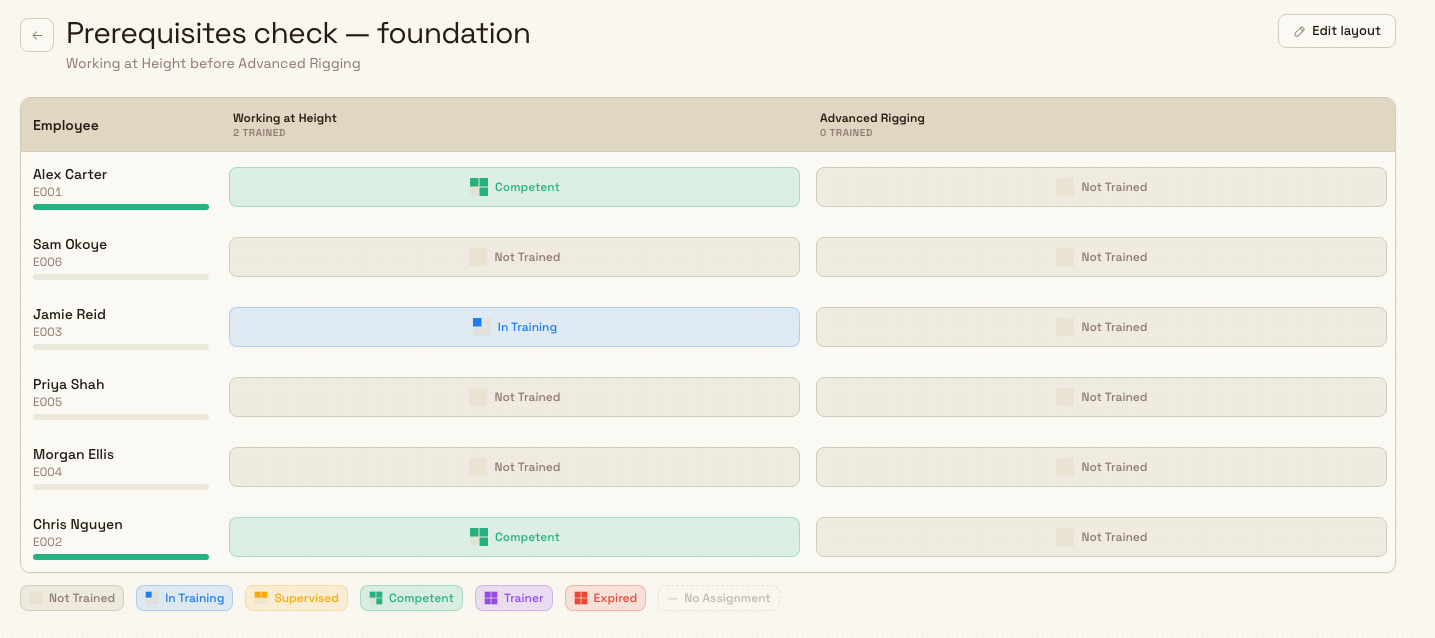
The Versatility Matrix is a grid of people (rows) against programs (columns), where each cell shows a skill level from Not Trained, through In Training, Supervised, and Competent, up to Trainer. Before you assign or schedule someone for a dependent program, find them in the matrix and check that their cell for the foundation program shows a completed, current level such as Competent. This is your manual prerequisite check, and it is the surest way to catch someone who has skipped a step.
training.prerequisites-02
Example: Leeds Fabrication Plant
Granite Peak Manufacturing runs a fabrication cell at its Leeds Fabrication Plant, where riggers must hold a height qualification before they train on advanced rigging.
In the Training Catalog, the quality lead sets up two programs in the Safety category: Working at Height (Mandatory, valid for 24 months) as the foundation, and Advanced Rigging (Mandatory) as the dependent program. When a new intake of fabricators starts, she assigns Working at Height first, and the supervisor records each person's completion with their certificate as evidence.
A week later, before booking anyone onto Advanced Rigging, the supervisor opens the Versatility Matrix and reads down the Working at Height column. Two fabricators show Competent, so he assigns them Advanced Rigging. A third still shows In Training, so he holds that assignment back and schedules the height course again first. Nothing in Bulk forced this order — the supervisor enforced it by reading the matrix before assigning — but the result is that no one reaches the advanced work without the foundation in place.
What to expect
When you manage prerequisites this way, the foundation programs appear as Mandatory in the catalog, each person's progress is visible in the matrix, and the compliance dashboard tracks the foundation certifications toward their expiry like any other training. You get a clear, auditable trail — assignment, completion, evidence, and skill level — for every step in the sequence, even though the order itself is one you apply rather than one the system imposes.
Limitations and feature state
The Training module is generally available. The way prerequisites are handled has specific limits you should plan around:
- No dedicated prerequisites screen. There is currently no interface to record, against a program, the list of programs that must be completed first. Manage the order using requirement levels, assignment sequence, and the matrix as described above.
- No automatic enforcement. Bulk does not block, warn, or flag an assignment when a foundation program is incomplete. An advanced program can be assigned and completed regardless of whether earlier training is done.
- Per-site. Programs and their requirement levels belong to the site (in Bulk, an entity) you are working in. A program created at one plant is not shared with another, so any prerequisite sequence you run is scoped to a single plant.
Troubleshooting
- You cannot find where to set a program's prerequisites. This is expected — the current app does not expose a prerequisites field on a program. Manage the requirement instead by assigning and completing the foundation program first, and by checking the Versatility Matrix before you assign the dependent program.
- Someone was assigned advanced training before finishing the basics. Bulk will not have stopped this, because it does not enforce an order between programs. Use the Versatility Matrix to catch it: find the person, confirm whether the foundation program is complete, and if it is not, record that training (or reassign it) before they carry out the dependent work.
- A completed prerequisite no longer counts. A foundation program with a validity period expires like any certification. If the matrix or dashboard shows it as expired, renew it so the prerequisite is current again before relying on it for advanced work.
Related guidance
- Training overview — how the whole Training module fits together.
- Browse the training catalog — where programs and their requirement levels live.
- Create a training program — set up a foundation or dependent program, including its requirement level.
- Manage training categories — group foundation and advanced programs together in the catalog.
- Assign training — give the foundation program to people before the dependent one.
- Record training completion and evidence — mark the foundation complete so it counts toward the next step.
- Use the training matrix — confirm a person's skill level before assigning dependent training.
- Review training records — see one person's full training history and current status.
- Renew expiring training — keep a foundation certification valid so the prerequisite stays current.
- People and training — the wider module this sits in.
Create a training program
Add a new training program or certification to the Training Catalog, set its requirement level and validity period, and place it in a category so you can assign and track it.
Use the training matrix
Read workforce competency in the Versatility Matrix, a grid of people against training programs, and record, renew, or adjust skill levels directly from any cell.