Training
Track workforce competency, certifications, and training compliance across your plant using the Training module's dashboard, records, versatility matrix, and catalog.
The Training module keeps a live record of what training and certifications each person needs, whether those are complete and still valid, and where competency gaps put production or compliance at risk. A certification is a qualification that can expire (for example a forklift licence), and a competency is how capable someone is at a task, tracked here as a skill level. Instead of chasing spreadsheets, you manage all of this in one place and let Bulk flag anything that is overdue or about to lapse.
Use the Training module when you need to prove regulatory or customer compliance, plan cross-training so a line is never short of qualified operators, and catch expiring certifications before they lapse. It is the shared source of truth for quality managers, production supervisors, and people (HR) leads.
Where to find it
Training lives in the People group of the main navigation, under the Training heading. It opens onto four areas:
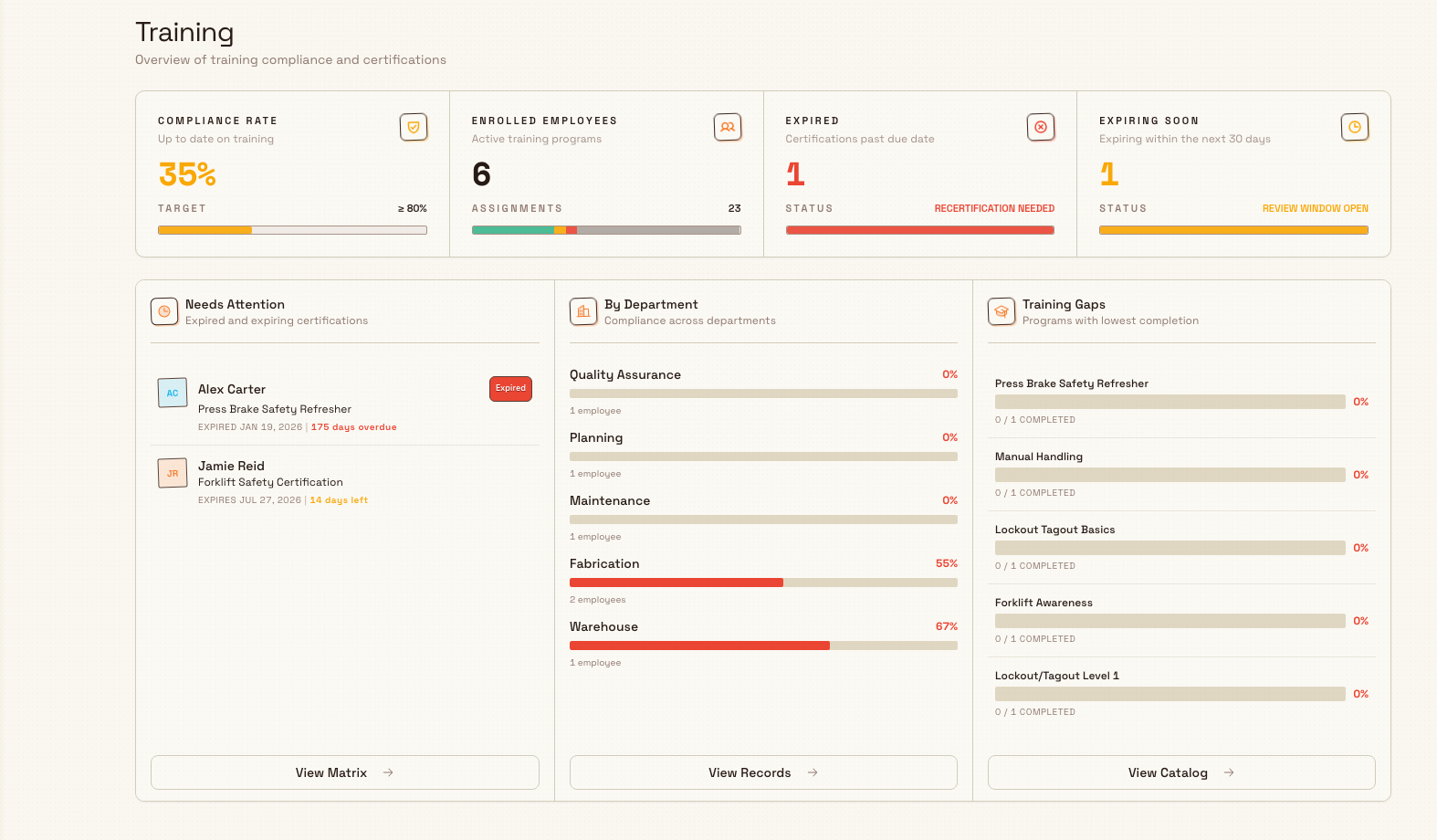
- Home — a compliance dashboard for the whole plant.
- Records — current training status for each person.
- Matrix — the Versatility Matrix, a grid of people against training programs.
- Catalog — the Training Catalog, where you define programs and categories.
training.overview-01
Before you start
Training is part of the People module, so your workspace must have People enabled for the module to appear.
What you can do depends on your permissions:
- View the dashboard, records, and matrix requires the
training_matrix.viewpermission; browsing the catalog requirestraining_programs.view. - Manage the catalog, assignments, and matrix layouts requires the matching create, manage, and delete permissions (for example
training_programs.create,training_assignments.manage, andtraining_matrix.manage).
Owners have every permission. The built-in Training role grants the full set of training permissions, and the built-in People role includes them alongside employee management. If Training does not appear, or an action is unavailable to you, ask an owner or administrator to grant one of those roles. Exact button-level behavior is confirmed during live screenshot capture.
The four areas
Home — compliance at a glance
The Home dashboard opens with a summary strip: Compliance rate (how much of the workforce is up to date), Assignments (a breakdown of OK, Expiring, Expired, and Incomplete), Expired (certifications past their due date), and Expiring soon (anything expiring within the next 30 days). Below it, three widgets help you act: Needs Attention lists expired and expiring certifications, Department compliance compares teams, and Program gaps shows where assigned training has not been completed.
Records — status per person
The Records area tracks current employee training status drawn from matrix assignments. You can filter by name search, compliance status, and department. Each person is shown with a compliance tier — Compliant, Partial, or At Risk — based on how much of their training is complete and current. Open a person to see their full training history and evidence.
Matrix — the versatility matrix
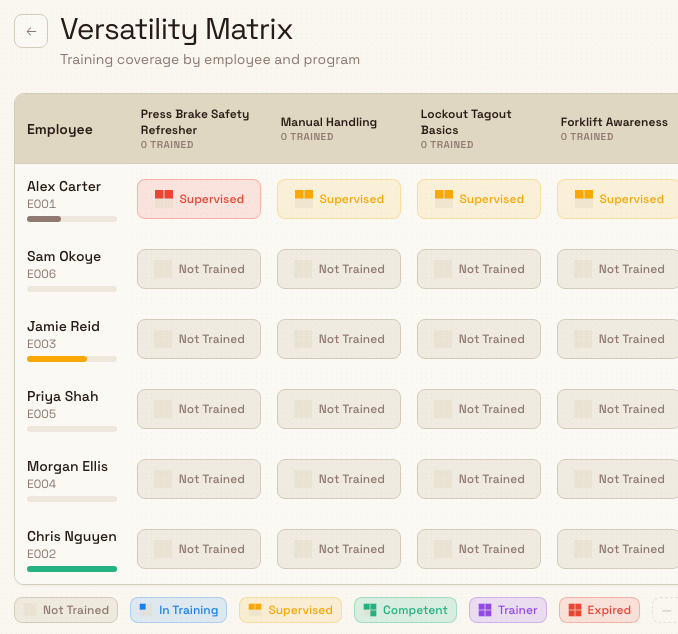
The Matrix area (titled Versatility Matrix) is a grid with people as rows and training programs as columns. Each cell shows a skill level from Not Trained, In Training, Supervised, Competent, to Trainer, so you can see at a glance who can cover which task. You can open the full matrix or a saved layout that narrows the grid to a specific set of trainings and people.
training.overview-02
Catalog — programs and categories
The Training Catalog is where you define the training your plant tracks. A category is a color-coded grouping (such as Health and Safety), and a program is a single course or certification with a code, a name, an optional category, an optional validity period in months, and a requirement level. Group your programs into categories first, then add the programs themselves.
Key terms
- Category — a grouping used to organize programs in the catalog.
- Program — a course or certification you track, optionally valid for a set number of months.
- Requirement level — whether a program is
mandatory,recommended, oroptional. - Assignment — the link between one employee and one program; this is the record that carries dates, status, evidence, and skill level.
- Skill level — a person's competency for a program, from Not Trained through Trainer.
- Compliance status — a program's current standing for a person: valid, expiring soon, or expired.
- Certificate — an evidence file (such as a scanned certificate) attached to an assignment; evidence is kept across renewals.
- Provider — who delivered the training, recorded against a completion.
Everyday workflows
Most work in the module follows a short cycle: assign the training a person needs, record completion with evidence when they finish, and renew it before it expires. Each step has its own guide, linked below.
Example: Leeds Fabrication Plant
Granite Peak Manufacturing runs its fabrication cell at the Leeds Fabrication Plant. In the Training Catalog, the quality lead creates a category called Health and Safety and adds two programs: Counterbalance Forklift Licence with a validity of 36 months and a mandatory requirement level, and MIG Welding Qualification for the welders. She assigns the forklift licence to the warehouse team and the welding qualification to the fabrication cell, then records each person's completion and attaches their certificate as evidence.
A month later the Home dashboard shows the plant at a healthy compliance rate, but the Needs Attention widget lists three forklift licences expiring within 30 days. The supervisor renews them from each person's record, uploading the refreshed certificates. On the Versatility Matrix, a saved layout named for the fabrication cell shows two welders at Competent and one new hire at In Training, so the supervisor knows not to schedule that shift without cover.
What to expect
Once your programs are in the catalog and assignments are recorded, the Home dashboard, Records, and Matrix stay current on their own. Certifications with a validity period are tracked toward their expiry, and anything within 30 days of lapsing surfaces under Expiring soon and in the Needs Attention widget. Compliance figures are only as complete as the assignments and completions you record.
Feature state
The Training module is generally available. It is scoped to a single entity (plant), so the dashboard, records, matrix, and catalog reflect the plant you are currently working in; a program or category created in one plant is not shared with another.
Troubleshooting
- A person or program is missing from Records or the Matrix. Records and the matrix are built from assignments, so a person with no assignment for a program will not appear against it. Check that the program is active in the catalog, that the person has an assignment, and that your Records filters (search, status, department) are not hiding them.
- You cannot open Training or an action is unavailable. This is almost always a permissions gap. Confirm that People is enabled and ask an owner or administrator for the Training or People role.
Related guidance
Publish company news
Write and publish company news posts so everyone at a site sees announcements, welcomes, and milestones on the People News page and on Home.
Review training records
Open the Training Records page to review each employee's training compliance, filter by status or department, and drill into one person's completed, expiring, and expired training.