Quality and compliance
Find, fix, and prevent quality and safety problems and run scheduled compliance audits with the Quality, Safety, and Audits modules, with task guides.
Last updated
Quality and compliance is the part of Bulk you use to keep the work you ship correct and safe, and to prove it. It brings three modules together: Quality, where you record and resolve defects; Safety, where you assess risk and log incidents; and Audits, where you run scheduled checks that keep the plant compliant. This page explains how those pieces fit and links to a full guide for each end-to-end workflow.
Reach for this area whenever something is wrong with the product, someone gets hurt or nearly does, or a standard requires you to inspect and record. Instead of spreadsheets and paper checklists scattered across a site, Bulk keeps every problem, action, and check in one place, linked to the order, job, asset, or area it came from.
What this area covers
The work here follows three recurring patterns, each with its own module and its own guide:
- Resolve a quality problem — capture a defect, contain the affected material, investigate the root cause, and drive a corrective action to closure. This is the Quality module.
- Manage safety risk — assess the hazards of a task or asset, score them, and log and investigate incidents when something goes wrong. This is the Safety module.
- Run a compliance audit program — schedule recurring checks against a template, complete them on the floor, and review the results. This is the Audits module.
You can read this page top to bottom to understand the whole area, or jump straight to the workflow you need below.
Before you begin
Two things decide what you can see and do:
- Module access. The Quality, Safety, and Audits modules only appear in the left sidebar under MODULES if your role grants access to them. Bulk ships dedicated Quality and Safety roles for teams who work in these areas full time, and administrator roles include everything. If a module you expect is missing, it is almost always a role matter rather than a fault, so ask your organization's administrator to grant it.
- The plant you are in. Each module works on the plant (also called a site or entity) you currently have open. Quality problems, safety records, and audits belong to a single plant. Switch plants from the plant switcher at the top of the sidebar when your work moves between sites.
Within a module, individual actions are gated by finer permissions. For example, anyone with quality access can view an issue, but closing one, dispositioning non-conforming material, or releasing a hold each require their own permission. Your administrator manages these per role.
Resolve a quality problem
Open the Quality module and select Home for an overview of quality metrics: a strip of key figures, a live summary, a Pareto chart of the most common defects, and a first-pass-yield trend. The New menu offers New Issue, New NCR, New CAPA, and New 8D Report. Holds are shown in the summary and have their own sidebar area.
The Quality module organizes work into linked record types:
- Issues — the everyday record of a defect or problem. Most quality work starts here.
- NCRs — a non-conformance report, the formal record that material or a process did not meet its specification.
- CAPAs — a corrective and preventive action, the tracked plan that fixes a root cause and stops it recurring.
- Holds — a hold quarantines suspect material so it cannot move forward until someone reviews and releases it.
- 8D Reports — an 8D report works a serious problem through the eight-discipline problem-solving method used with customers and suppliers.
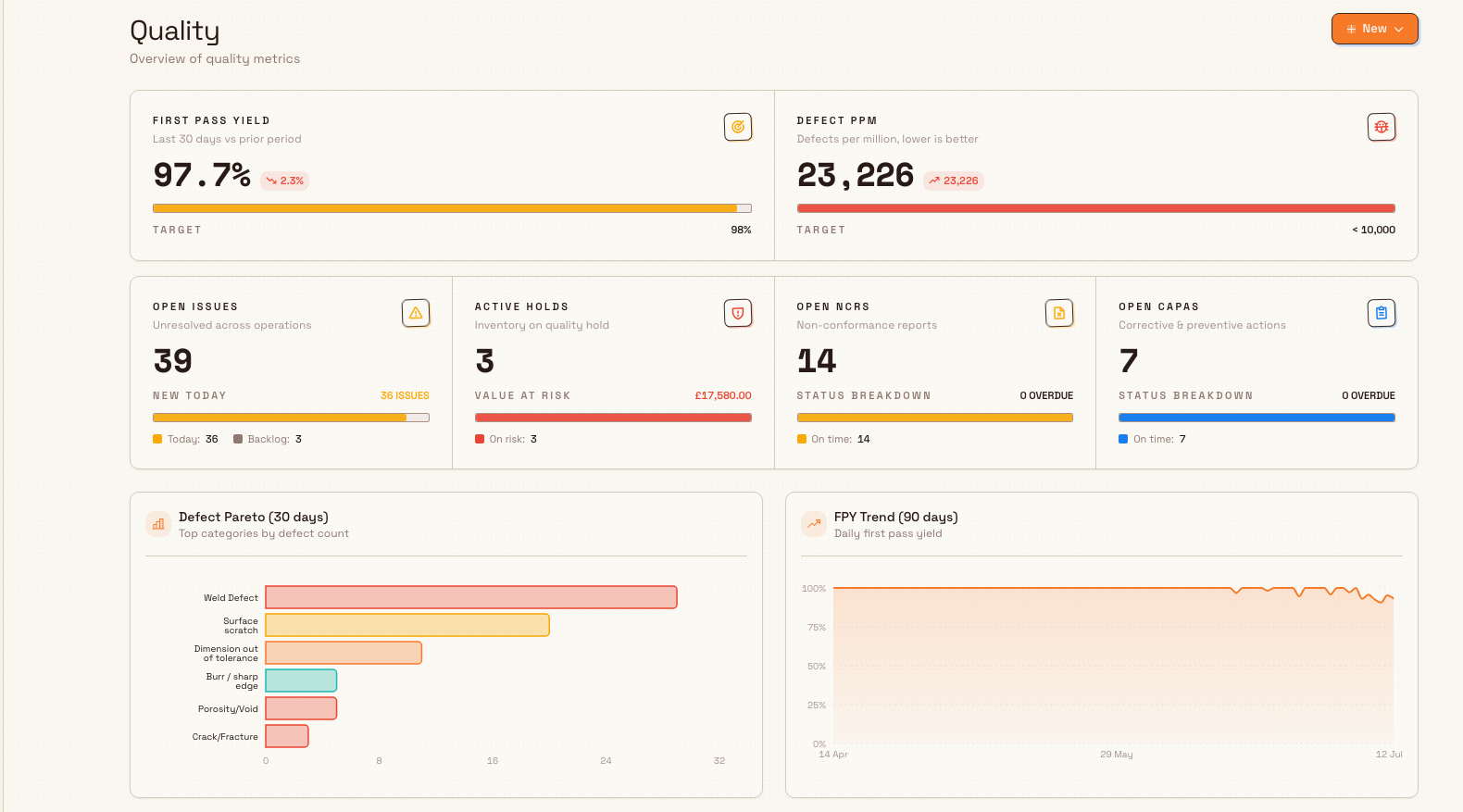
For the full walkthrough of capturing a defect, containing material, and driving a corrective action to closure, see Resolve a quality problem. For step-by-step guides on each record type, see the Quality reference — including Create a quality issue and Create an NCR.
Manage safety risk
Open the Safety module and select Home for an overview of safety performance and approvals. The Safety module covers two related jobs — anticipating hazards before work starts, and recording what happens when something goes wrong:
- Risk Assessments — a risk assessment records the hazards of a task or asset and the controls that keep them in check.
- Risk Matrix — the risk matrix scores each hazard by how likely and how severe it is, so the highest risks stand out.
- Incidents — the log of accidents, injuries, and near misses, each of which you can investigate and approve.
- Asset Readiness — pre-use checks grouped by asset, so an operator confirms a machine is safe to run before starting a shift.
The New menu on Safety Home offers New Incident and New Risk Assessment. These take you to incident reporting and the risk-assessment area. For the end-to-end workflow, see Manage safety risk. For individual tasks such as scoring and approving, see the Safety reference, including Create a risk assessment and Report a safety incident.
Run a compliance audit program
An audit is a structured check you run against a template — a fixed list of questions with pass, fail, and evidence responses. Open the Audits module to see the audits assigned to your areas, grouped into Overdue, Due today, In progress, and Completed / last 7 days. Pick an overdue or due row to start a check, or an in-progress row to resume it. The Completed section shows recent scores and the person who completed each audit; those summary rows do not open a report.
Bulk supports several audit types, each with its own view in the sidebar: Safety Audits, Quality Audits, Maintenance Audits, Pre-use Checks, Custom Audits, and 5S audits. To run one on demand rather than waiting for its schedule, use Begin in the Start a new audit band and pick the audit type, the template, and the area.
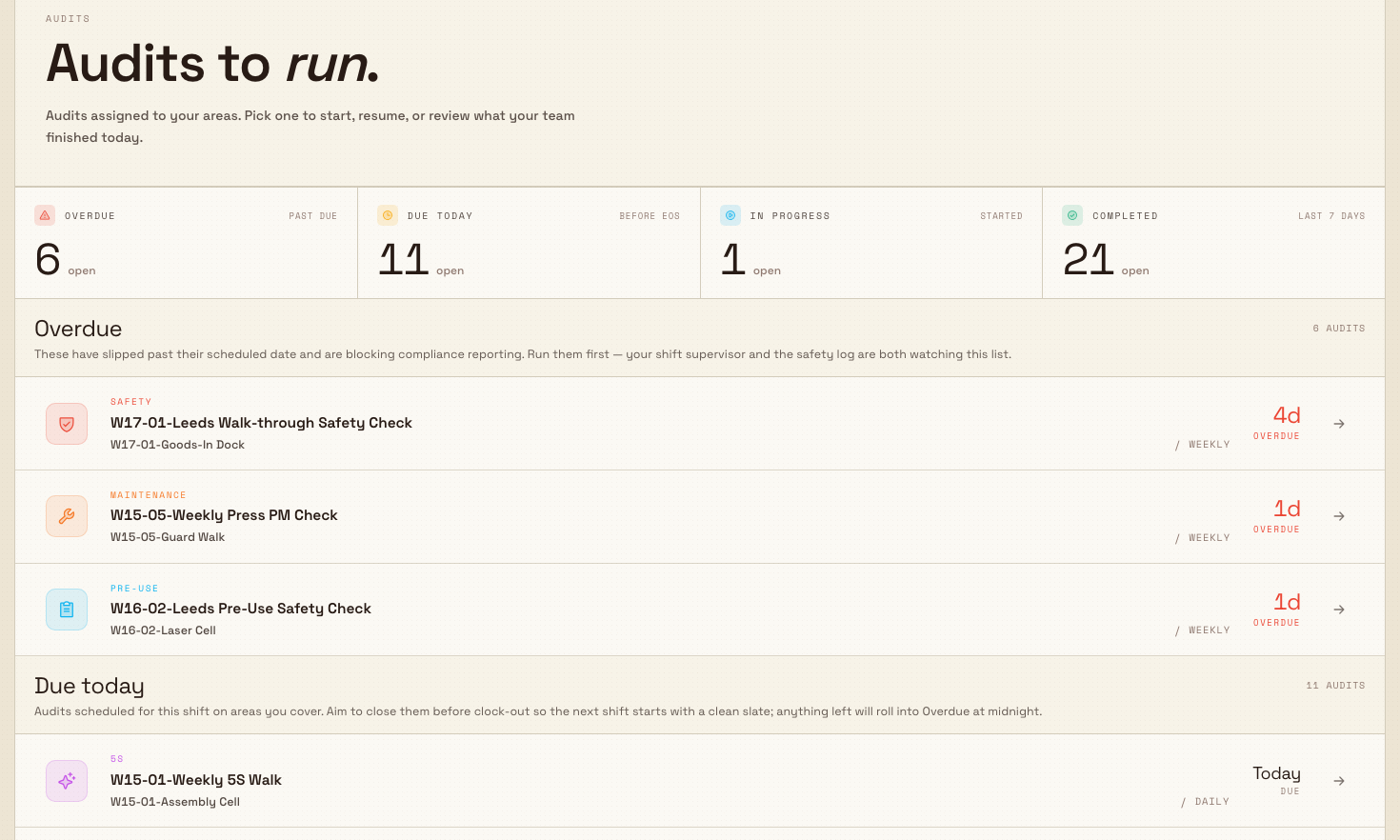
For the full program workflow — scheduling recurring checks, completing them on the floor, and reviewing results — see Run a compliance audit program and the Audits reference. Administrators who set up templates, areas, and schedules should start with Audit configuration.
A Wayne Enterprises example
In this fictional example, Wayne Enterprises runs precision fabrication at Gotham Applied Sciences. A laser-cut bracket comes off the line with burred edges that fail inspection. The sequence illustrates the workflow; the screenshot refresh did not perform these production or safety actions.
- The line inspector opens Quality and raises an Issue against the job, attaching a photo of the burr.
- Because the whole batch is suspect, she puts it on a Hold so it cannot ship while the cause is unknown.
- The quality engineer investigates, confirms the batch is out of specification, and formalizes it as an NCR. He decides the parts can be reworked, dispositions the material, and opens a CAPA to retune the laser's edge routine so the defect does not return.
- The near miss from a jammed offcut is logged in Safety as an Incident, and the team reviews the laser's Risk Assessment to check its controls still hold.
- At the next shift start, the operator's Pre-use Check on that laser — surfaced under Asset Readiness and driven by a scheduled Safety Audit — confirms the guard and interlock are sound before work resumes.
One defect flows from a floor issue, through containment and root cause, into a preventive action and a verified safe restart — all linked and recorded.
Expected result
Working across these three modules, you can:
- capture a quality problem, contain the affected material, and close it out with a tracked corrective action;
- assess and score the risk of a task or asset, and log and investigate incidents when they happen; and
- run scheduled and on-demand audits, and review their results with the evidence attached.
Every record stays linked to the order, job, asset, or area it relates to, so you keep an audit trail without extra paperwork.
Feature state and what to expect
The Quality and compliance area is available and supported. Some newer capabilities are still in Beta — they work, but their screens and behavior may still change, so treat them as previews rather than finished features:
- The current Quality navigation shows Home, Issues, NCRs, CAPAs, Holds, and 8D Reports without Beta badges.
- Related analytics carry Beta labels too — the 5S Dashboard under Analytics, and the Displays area used to show dashboards on screens around the plant.
Your menu reflects your access
If a module or a record type described here is missing, it is almost always because your role does not grant it, not because the feature is off. Ask your administrator to adjust your role, then reload.
Related guidance
- Resolve a quality problem — the end-to-end quality workflow.
- Manage safety risk — the end-to-end safety workflow.
- Run a compliance audit program — the end-to-end audit workflow.
- For quality and safety teams — the day-to-day tasks these roles depend on.
- Quality reference, Safety reference, and Audits reference — detailed, per-task guides.
- Audit configuration, Configure quality categories and root causes, and Configure safety types and settings — setup for administrators.
Manage materials through production
Follow consumable materials end to end in Bulk: define them, receive stock, consume them at the workstation, and replenish, with the screens each uses.
Resolve a quality problem
Take a quality problem from first report to closure in Bulk: capture the defect, investigate the root cause, decide a disposition, then close the issue.