What's new
Browse published Bulk releases and their notes, then open a version for the full list.
Last updated
What's new is Bulk's published release history. Use it when you want a plain-language summary of what changed in a shipped app version: for example after Wayne Corp upgrades, or when Bruce Wayne at Gotham Applied Sciences wants to brief the team on the latest production, inbound, or settings updates.
This documentation page and the in-app What's new dialog share the same release archive. Only notes that have been promoted into a concrete app version appear here. Work still in progress is never listed.
Browse published releases
Open What's new from the documentation sidebar (top-level item next to Integrations). The path is /en/whats-new/.
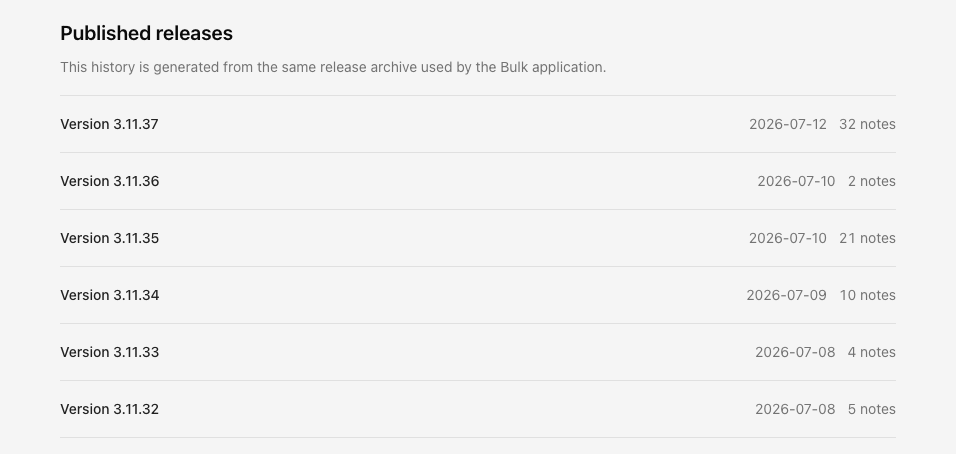
Below this guide, the page lists every published release under the heading Published releases, with the short explanation that the history is generated from the same release archive used by the Bulk application. Releases are ordered newest first.
Each row shows:
- Version: the frontend app version (for example Version 3.11.37)
- Release date: the date that version was published (
YYYY-MM-DD) - Note count: how many user-facing notes shipped with that version (
1 noteorN notes)
Select a row to open that version's note page.
Read the notes for one version
A version page opens at /en/whats-new/<version>/ (for example /en/whats-new/3.11.37/). The page shows:
- An eyebrow line Released with the version's date
- Title Version plus the version number
- A range line such as Notes 1 to 32 of 32 (or a slice of a longer list)
Notes appear as a numbered list in the order they were published. Each note is short, user-facing Markdown. Typical format:
**Area**: Plain description of what you notice.Examples from recent shipping style:
**Production**: …for shop-floor and order changes**Inbound**: …for document and receiving work**Settings , Master Data**: …for configuration areas
If a note is still experimental, the area label may include (Beta) (for example **Atlas (Beta)**). Treat those items as evolving rather than settled.
Large releases and pagination
Versions with many notes are split across pages of 100 notes each:
- Page 1 is always
/en/whats-new/<version>/ - Later pages use
/en/whats-new/<version>/page/<n>/(for example page 2 of a long release) - Footer controls are Previous page and Next page, with Page X of Y in the middle
A version with more than 100 notes (some historical releases exceed that) needs more than one page. Note order is preserved across page boundaries.
What's new inside the Bulk app
Signed-in users can open the same history without leaving Bulk:
- In the top header, open Help (question-mark control; accessible name Help).
- In the Help & support menu, choose What's new.
The menu also shows the running APP and API version chips so you can confirm which frontend and backend builds you are on.
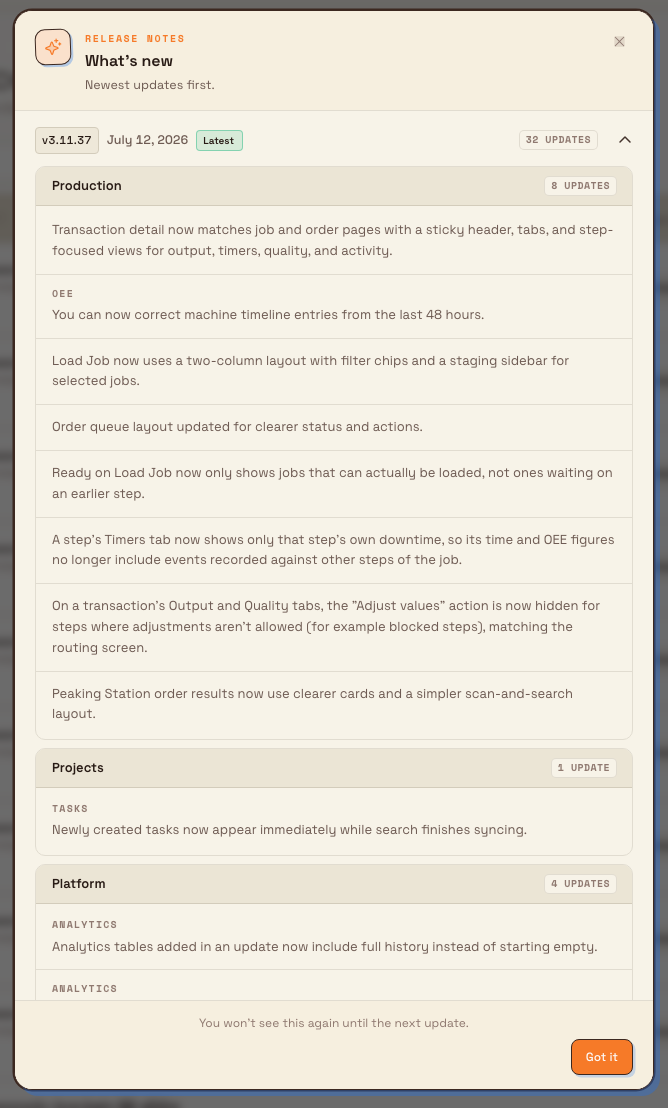
The dialog title is What's new, with description Newest updates first. Releases expand in an accordion:
- Each row shows a version badge (
v…), a readable date, an update count, and a green Latest badge on the newest release - The running app version's row opens by default when that version shipped notes; otherwise the newest release opens
- Notes are grouped by product module (for example Production, Inbound, Settings). Beta notes appear under In beta; other notes under Updates when any beta notes exist
- Category cards may show a Beta badge and an update count such as
N updates - Scroll inside the dialog to read more notes. Show older releases expands the older part of the archive.
Footer copy: You won't see this again until the next update. Confirm with Got it (or close the dialog). Closing marks the current frontend build as seen on this browser so the dialog does not auto-open again until a later frontend deploy ships notes.
When the dialog opens by itself
After you sign in, Bulk may open What's new automatically once when:
- The current frontend build has published notes for its version, and
- This browser has not yet acknowledged that version
The first authenticated visit on a browser quietly records the current version without replaying older history. If you open What's new from Help and no notes are bundled yet, Bulk shows No release notes yet.
What is included: and what is not
| Included | Not included |
|---|---|
| Notes promoted into a published frontend app version | Unreleased fragments still awaiting the next frontend deploy |
| User-facing product changes (frontend and backend, once published with a frontend version) | Internal tooling, developer-only messages, or empty versions |
| English notes on English documentation routes | Localized changelog routes (only English is generated today) |
Backend-only improvements still surface through this feed, but only after the next frontend deploy promotes them into a versioned release. Until then they do not appear on this page or in the dialog.
The public documentation list keeps each note's original wording and order. The in-app dialog may regroup notes by product module and split beta items into a separate section; that presentation difference does not change the underlying text.
Who can read What's new
- This documentation page: anyone who can open the public docs; no Bulk login or permission is required.
- In-app dialog: any signed-in user. There is no separate "view release notes" permission. Logged-out visitors (for example on the login page) do not see the auto-open dialog.
Troubleshooting
- A change you expected is missing. It may still be unreleased, or it may ship only with the next frontend deploy. Check whether your in-app APP version (Help menu) matches the version on this page. API-only deploys do not by themselves publish a new What's new entry.
- The in-app dialog never appears after an update. It opens only when the current frontend build has notes and this browser has not yet acknowledged that version. Use Help → What's new to open the history manually. Clearing site data resets the local "seen" marker and can change auto-open behavior.
- Help → What's new shows "No release notes yet." The running build has no shipped releases in its bundled archive (typical of a fresh or empty seed). Public docs may still list historical versions from the published feed.
- A long release seems incomplete. Large versions paginate at 100 notes per page. Use Next page on the version page, or open
/en/whats-new/<version>/page/2/and later pages. - You cannot find What's new under another language path. Changelog routes are English-only (
/en/whats-new/…). Other locale prefixes are not generated for this archive.
Related guidance
- Getting started: orientation for new Bulk users at a site such as Gotham Applied Sciences.
- Integrations: connectors and API access when a release mentions integration changes.
- Administration: settings and master data areas often named in release notes.
Published releases
This history is generated from the same release archive used by the Bulk application.
- Version 3.12.10115 notes
- Version 3.12.10024 notes
- Version 3.12.9971 notes
- Version 3.12.985 notes
- Version 3.12.9710 notes
- Version 3.12.9620 notes
- Version 3.12.953 notes
- Version 3.12.9429 notes
- Version 3.12.9312 notes
- Version 3.12.9214 notes
- Version 3.12.9156 notes
- Version 3.12.9023 notes
- Version 3.12.891 note
- Version 3.12.883 notes
- Version 3.12.8728 notes
- Version 3.12.862 notes
- Version 3.12.8512 notes
- Version 3.12.8411 notes
- Version 3.12.836 notes
- Version 3.12.821 note
- Version 3.12.8110 notes
- Version 3.12.803 notes
- Version 3.12.793 notes
- Version 3.12.784 notes
- Version 3.12.7714 notes
- Version 3.12.767 notes
- Version 3.12.756 notes
- Version 3.12.7411 notes
- Version 3.12.7329 notes
- Version 3.12.7292 notes
- Version 3.12.7181 notes
- Version 3.12.705 notes
- Version 3.12.696 notes
- Version 3.12.6817 notes
- Version 3.12.6713 notes
- Version 3.12.669 notes
- Version 3.12.6519 notes
- Version 3.12.6442 notes
- Version 3.12.6316 notes
- Version 3.12.6215 notes
- Version 3.12.6137 notes
- Version 3.12.6058 notes
- Version 3.12.5919 notes
- Version 3.12.5880 notes
- Version 3.12.5772 notes
- Version 3.12.5613 notes
- Version 3.12.551 note
- Version 3.12.5412 notes
- Version 3.12.5314 notes
- Version 3.12.5230 notes
- Version 3.12.5142 notes
- Version 3.12.502 notes
- Version 3.12.4916 notes
- Version 3.12.485 notes
- Version 3.12.473 notes
- Version 3.12.4623 notes
- Version 3.12.4527 notes
- Version 3.12.446 notes
- Version 3.12.429 notes
- Version 3.12.4124 notes
- Version 3.12.404 notes
- Version 3.12.3927 notes
- Version 3.12.302 notes
- Version 3.12.281 note
- Version 3.12.271 note
- Version 3.12.262 notes
- Version 3.12.2518 notes
- Version 3.12.2353 notes
- Version 3.12.2218 notes
- Version 3.12.2112 notes
- Version 3.12.1929 notes
- Version 3.12.1819 notes
- Version 3.12.1716 notes
- Version 3.12.161 note
- Version 3.12.1522 notes
- Version 3.12.1449 notes
- Version 3.12.928 notes
- Version 3.12.82 notes
- Version 3.12.71 note
- Version 3.12.62 notes
- Version 3.12.512 notes
- Version 3.12.433 notes
- Version 3.12.12 notes
- Version 3.12.011 notes
- Version 3.11.3732 notes
- Version 3.11.362 notes
- Version 3.11.3521 notes
- Version 3.11.3410 notes
- Version 3.11.334 notes
- Version 3.11.325 notes
- Version 3.11.311 note
- Version 3.11.308 notes
- Version 3.11.29120 notes
- Version 3.11.2811 notes
- Version 3.11.2717 notes
- Version 3.11.261 note
- Version 3.11.2524 notes
- Version 3.11.244 notes
- Version 3.11.2332 notes
- Version 3.11.223 notes
- Version 3.11.21127 notes
- Version 3.11.2019 notes
- Version 3.11.199 notes
- Version 3.11.1817 notes
- Version 3.11.17231 notes
- Version 3.11.1666 notes
- Version 3.11.1519 notes
- Version 3.11.1472 notes
- Version 3.11.1336 notes
- Version 3.11.1280 notes
- Version 3.11.87 notes
- Version 3.11.634 notes
- Version 3.11.04 notes
- Version 3.10.113 notes