Improvement and compliance
Find, fix, and prove out shop-floor problems with Bulk's Quality, Safety, and Audits modules, which together cover improvement and compliance work.
Last updated
Improvement and compliance is how this documentation groups the three Bulk modules you use to keep production correct, safe, and provable: Quality, Safety, and Audits. Between them they let you record a problem when it happens, work it through to a fix, and keep the checklists and inspections that show you followed your own process.
Bulk is a Manufacturing Execution System (MES): it runs the jobs your plant makes and tracks what actually happens on the floor. These three modules sit alongside production and capture the parts of the story that are not "did we make it" but "was it right, was it safe, and can we prove it".
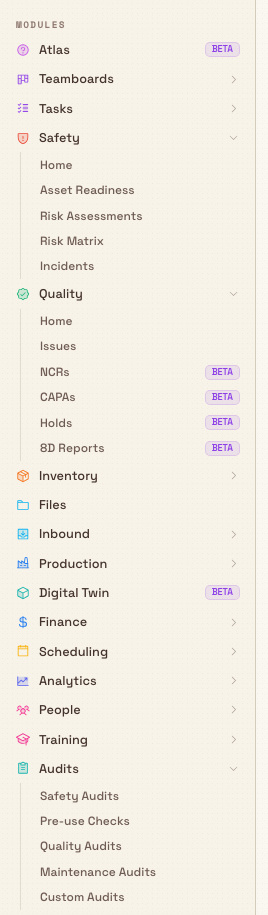
There is no single "Improvement and compliance" screen in Bulk. The name is a documentation grouping only. In the app, Quality, Safety, and Audits are three separate modules, each with its own entry in the left sidebar under the MODULES heading, and each opening on its own home page. Everything you see and change in all three is scoped to the site (called an entity) you currently have selected.
The three areas
Each module is a self-contained area. Open the one that matches the work in front of you.
Quality
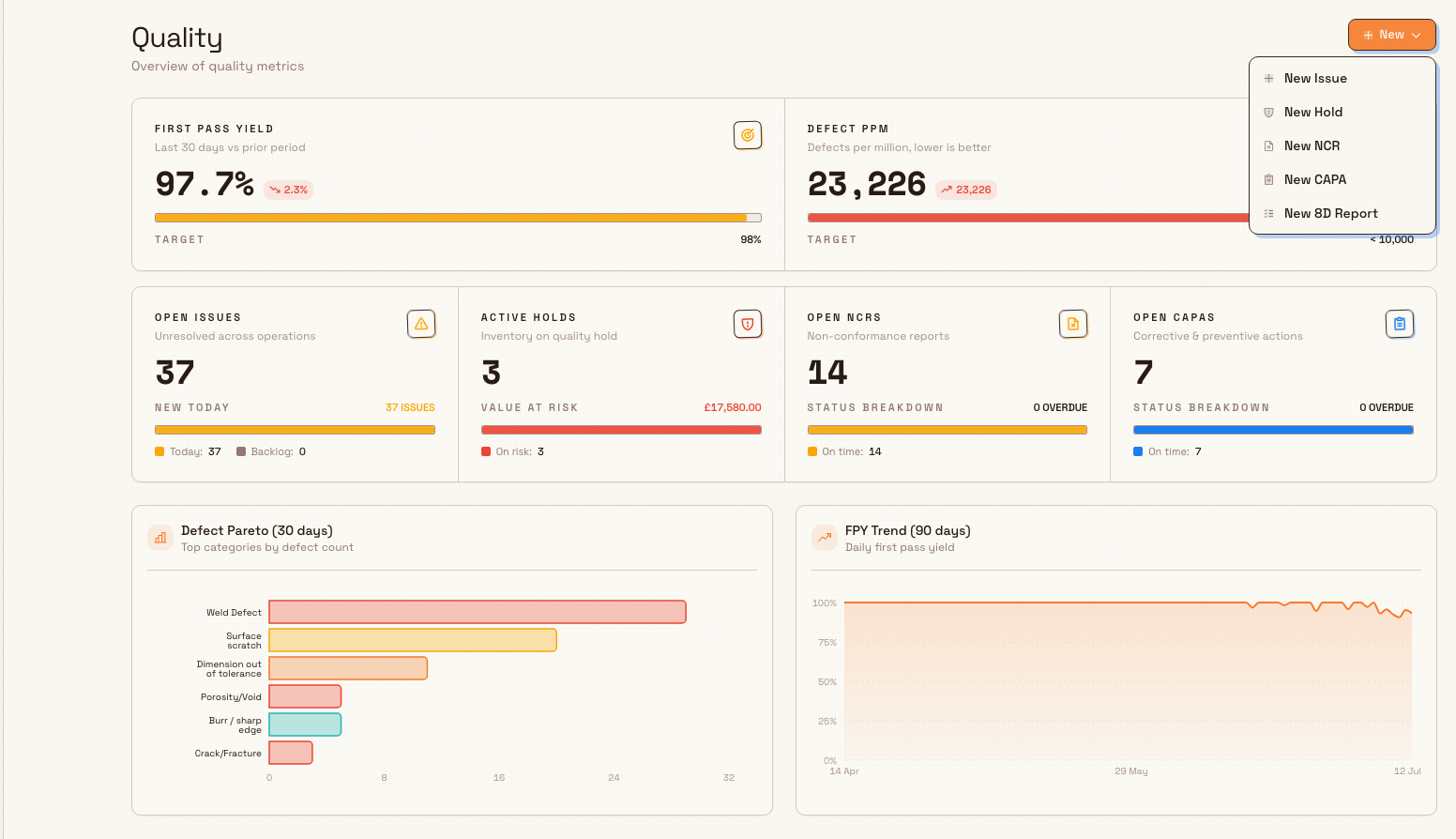
The Quality module tracks things that went wrong with the product and the actions that put them right. Open it from Quality in the sidebar; it opens on a Quality home page with a defect and first-pass-yield summary and a New menu for issues, NCRs, CAPAs and 8D reports. Holds have their own sidebar area. It holds:
- Issues — a defect or nonconformance you have spotted (for example, a weld that failed inspection). This is the everyday entry point for logging a quality problem.
- NCRs — Nonconformance Reports, a more formal record that a batch does not meet requirements, with review and Material Review Board decisions.
- CAPAs — Corrective and Preventive Actions, the tracked actions taken to stop a problem coming back.
- Holds — a quality hold that stops affected items from moving forward until someone releases them.
- 8D Reports — the eight-discipline problem-solving method for the most serious or recurring problems.
Safety
The Safety module covers people, hazards, and equipment readiness. Open it from Safety in the sidebar; it opens on a Safety home page headed "Overview of safety performance and approvals". It holds:
- Incidents — reports of accidents, injuries, and near misses, with an investigation and approval path.
- Risk Assessments — structured assessments of a hazard, its likelihood and severity, and the measures that control it. A Risk Matrix view plots them by risk level, and an assistant can help draft an assessment.
- Asset Readiness — pre-use checks that confirm a machine is fit to run before an operator starts on it.
Audits
The Audits module is where recurring checklists and inspections live and get carried out. Open it from Audits in the sidebar; it opens on a smart landing headed "Audits to run" that groups your work into Overdue, Due today, In progress, and Completed / last 7 days. Bulk ships several audit types, each with its own saved view:
- Safety Audits, Quality Audits, and Maintenance Audits — recurring inspections for each discipline.
- 5S Audits — the lean workplace-organisation standard (Sort, Set in order, Shine, Standardise, Sustain).
- Pre-use Checks — the same equipment-readiness checks that appear as Asset Readiness in Safety.
- Custom Audits — checklists you build for anything else.
How the three fit together
Used together, the modules form an improvement loop rather than three unrelated inboxes:
- A problem is found — an operator flags a defect as a Quality Issue, someone reports a Safety Incident, or an Audit response fails.
- Affected work is contained — a quality Hold stops a batch shipping, or an incident triggers an approval.
- The cause is worked — an NCR, a CAPA, or an 8D Report drives the fix and records who did what.
- The result is proved — recurring Audits and pre-use checks show the corrected process is being followed over time.
Problems can start in Production
Quality issues are often raised on the floor. A production routing can include a quality step, and a failed step creates a linked quality record, so the problem lands in the Quality module with its job context attached. See Quality steps in production and Link quality records to production.
Before you start
Two things determine what you can do in these modules.
- The right permission for each area. The three modules have separate permissions, so access is granted area by area. By default the Super user and Entity admin roles have full access to all three. Bulk also ships a dedicated Quality role and a dedicated Safety role for teams that only work in one area. Running audits is open to more roles: the Operator and Tablet user roles can view and run (execute) audits even though they cannot create audit templates. Note that the Manager role covers Safety and Audits but not the Quality workflow (Issues, NCRs, CAPAs, Holds, and 8D Reports), which needs the Quality role, Entity admin, or Super user. All of these permissions apply only to the site you have selected. See Roles and permissions.
- The supporting setup. Each module reads from settings you configure once. Quality issues use defect categories and root-cause lists; audits need a published template and, usually, a schedule and an area; incidents use incident types. If a list is empty you may have nothing to choose from when you create a record. See Quality categories and root causes, Audit templates, and Safety types and settings.
If a module is missing from your sidebar
You only see a module's links if your role includes at least its view permission for the selected site — a Quality permission such as View quality issues, View safety, or View audits. If Quality, Safety, or Audits is missing from your sidebar, ask a site administrator to grant you the relevant role or permission, then reload.
Example: a weld defect at Gotham
In this fictional example, an operator at Wayne Enterprises' Gotham Applied Sciences site runs a welding job for Gotham Rail Works. A visual check finds porosity on several parts. The sequence shows how the modules fit together; the screenshot refresh did not perform these production, approval or audit actions:
- Quality — contain and record. From the Quality module the team creates a New Issue for the porosity, then places a Hold on the affected batch so it cannot move to the next step or ship. Because the batch is a formal nonconformance for a customer order, they raise an NCR as well.
- Quality — fix and prevent. The NCR review points to a drifting shielding-gas setting. The team opens a CAPA to correct the regulator and add a check, and because this is the third porosity event this quarter they run a full 8D Report to prove the root cause is gone.
- Safety — the near miss. During the rework an operator notices the cell's extraction was weak and reports a Safety Incident (a near miss). A supervisor reviews the linked Risk Assessment for the welding cell and confirms the controls.
- Audits — prove it holds. The weld bay is already on a weekly 5S Audit and a daily Pre-use Check, so the corrected setup and the tidier cell show up as passing audit responses over the following weeks — the evidence that the fix stuck.
What you will see
There is no combined report that spans all three modules. Instead, each area keeps its own live records for the selected site: open Quality Issues, NCRs, CAPAs, Holds, and 8D Reports in Quality; Incidents, Risk Assessments, and Asset Readiness in Safety; and due, in-progress, and completed inspections in Audits. Together they give you a defensible trail: the problem was found, contained, worked, and checked.
Feature state and limitations
The modules are available. Read the per-module articles for the full record lifecycle and permission requirements.
- Current sidebar labels. Safety, Quality and Audits child links have no Beta badges. This includes Quality NCRs, CAPAs, Holds and 8D Reports, which were badged in the previous design.
- Everything is site-scoped. All records, permissions, and audits belong to the site (entity) you have selected. To work on another site, switch sites first; you will not see one site's quality holds or incidents while another is selected.
- The grouping is documentation-only. Because "Improvement and compliance" is not a screen, there is no shared cross-module dashboard here. Reach for the module home pages and the Analytics 5S dashboard for roll-ups.
Troubleshooting
- A module is not in my sidebar. You are missing that module's view permission for the current site, or you have the wrong site selected. Confirm the site, then ask an administrator to grant the role or permission. See Roles and permissions.
- I can open Audits but there is nothing to run. The "Audits to run" landing only lists audits that are scheduled and assigned to areas you cover. If it is empty, an administrator needs to publish a template and set up a schedule and area. See Audit templates and Audit schedules.
- I can see Safety and Audits but not the Quality lists. The Manager role does not include the Quality workflow permissions. To work Issues, NCRs, CAPAs, Holds, or 8D Reports you need the dedicated Quality role, Entity admin, or Super user.
- A record I created is not where I expected. Check the selected site. A quality hold or incident is only visible while its own site is selected.
Related guidance
- Quality — module overview, then Create a quality issue, Create an NCR, Manage a CAPA, Place a quality hold, and Manage an 8D report.
- Safety — module overview, then Report an incident, Create a risk assessment, and Asset readiness and pre-use checks.
- Audits — module overview, then Start an audit, Review audit results, and the 5S audit and pre-use audit guides.
- Setup: Roles and permissions, Quality categories and root causes, Audit templates, and Safety types and settings.
Use files in another module
Reuse documents and images stored in Files by linking them to a manufacturing process revision with the shared file picker.
Quality
Understand the Quality module in Bulk, where to find it, what it manages, and how quality issues, NCRs, CAPAs, holds, and 8D reports connect across production.